Share:
If you run an appliance service business, you already know this frustration.
Parts ship… but nobody knows where they are.
Tracking numbers get buried in vendor emails. Someone forgets to copy them into the job file. Customers call asking for updates, and your team scrambles to dig through inboxes trying to figure out what happened.
This automation fixes that.
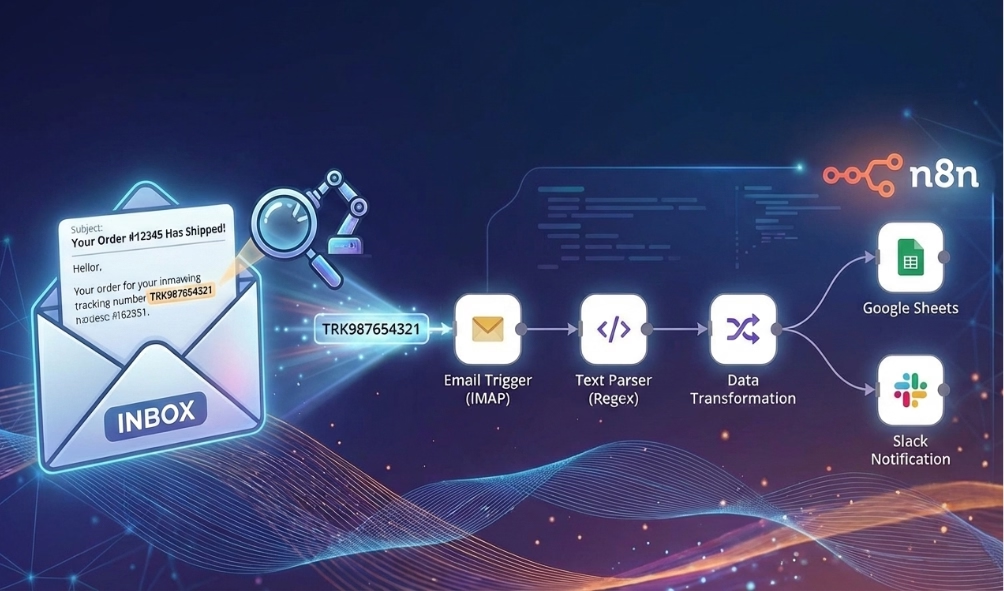
It automatically reads Marcone (or any vendor) shipping emails, extracts tracking numbers using AI, ignores counter sales, and logs everything into a Google Sheet without you lifting a finger.
In most appliance businesses, parts tracking breaks down because vendor emails are a mess.
They are unstructured, inconsistent, and often buried inside long HTML threads.
Even worse, “Counter Sales” (pickup orders) look almost identical to shipping orders. They shouldn’t be tracked, but they still clutter your inbox.
When you rely on someone remembering to copy/paste tracking numbers, you end up with missed delivery updates, reactive customer communication, and technicians waiting on parts with no visibility.
This automation eliminates all of that background noise.
Here is what happens automatically when you turn this on:
No inbox digging. No manual copying. No missed updates.
One of the most important parts of this automation is what it doesn’t process.
If the email shows Shipping Method = COUNTER, the workflow immediately stops.
This matters because counter sales don’t need tracking. They just create noise and waste time.
We explicitly instruct the AI to detect these cases and exit before doing any further work.
For shipping orders (non-counter), the AI extracts and standardizes:
Even if the email format changes slightly, the AI adapts and finds the data.
Vendor emails are notorious for weird naming conventions. You might see FEDEX-GND, UPS GROUND, or other variations.
This automation standardizes all of those to simply “FedEx” or “UPS”.
That might seem small, but it is critical for downstream reporting and dashboards. If you want to use a carrier tracking API later, you need clean data, not random text.
This automation is commonly used for:
Some companies track every shipment, while others use this as a trigger for delay alerts. It is the first brick in a full parts-tracking system.
You don’t need a new parts system. You just need your data where you can see it.
Traditional parsing scripts break the moment a vendor changes their email layout. AI doesn’t.
This workflow survives layout changes, extra text, missing fields, and messy HTML. And when something is uncertain, the automation flags it instead of guessing.
That is the difference between a demo and a production workflow.
This workflow is designed as a template. You import it and plug in your credentials.
Open the Gmail Trigger node and connect your Gmail credentials. This workflow is already pre-configured to filter for:
Note: Double-check the sender address in your real emails. If Marcone uses a slightly different sender in your region, update it here. We recommend polling every 5 minutes.
This workflow uses OpenAI in two places: the AI Agent and the Information Extractor.
The AI Agent is instructed that if the Shipping Method is “COUNTER”, it should return the word “COUNTER”. An IF node checks for that value and stops the workflow if found.
This is intentional. Counter pickups don’t need tracking, and this prevents clutter. Do not remove this step.
Open the Append row in sheet node and connect your Google Sheets credentials.
Minimum recommended columns:
This workflow outputs a packages array. It logs packages[0].tracking_number, packages[0].customer, etc.. If you need to support multiple packages per email later, we can adjust this to loop through all packages.
If it fails, it is usually a Gmail filter mismatch or a Sheets column mismatch.
Once the test passes, toggle the workflow Active. From now on, every Marcone shipping email gets parsed automatically. Tracking data logs into your sheet, and no one has to copy/paste anything ever again.
Does this work for vendors other than Marcone? Yes. While the template is set up for Marcone, the AI extraction logic works for almost any shipping email (Reliable Parts, Tribles, etc.). You just need to update the Gmail Trigger to watch for that vendor’s email address and subject line.
What happens if an email has multiple tracking numbers? The current template grabs the first package’s information. It can be easily modified to loop through and create a separate row for every package if your vendor splits shipments often.
Can I send the tracking number to the customer automatically? Absolutely. You could add a node after the Google Sheets step to send an SMS (via Twilio) or an email to the customer saying, “Your part has shipped!”
Parts tracking shouldn’t depend on someone’s memory.
This automation turns messy vendor emails into structured data automatically. It removes the noise of counter sales and gives your team real visibility into what is shipping and when.
AI handles the messy emails. Your team handles the decisions. That is how automation should work in a service business.
Ready to stop chasing parts? Let’s build this for you at Super Service Bros.