Want more CODs, not just leads? You’re in the right place.
Share:
Do you ever lay awake at night wondering what your CSRs are actually saying to customers It is the classic service business nightmare.
You spend thousands on marketing to make the phone ring. But if the person answering the phone sounds bored, unsure, or rude, you are literally lighting money on fire.
I talk to owners all the time who say, “I want to review calls, but I just don’t have the time.” And I get it. Listening to 50 recordings a week is impossible when you are trying to run a business. So, issues with greetings or missed booking opportunities don’t get fixed until a customer screams or your booking rate tanks.
But what if you didn’t have to listen?
What if you had a robot that listened to every single call, scored it, and handed you a report card? That is what we are building today: an AI CSR Phone Call Reviewer Automation.
It’s a game-changer. It automatically reviews recordings, scores them on professionalism and helpfulness, and logs everything in a spreadsheet.
No more “I’ll get to it later.” Just clear, actionable data.
100% Coverage: The AI reviews every call, not just the random few you have time to click on.
Objective Scoring: It uses a consistent 1-100 scale for things like “Greeting” and “Confidence,” removing your personal bias.
Instant Feedback: You get a Google Sheet with strengths, weaknesses, and summaries for every interaction.
Coaching, Not Policing: Use the data to show your team where to improve, rather than just catching them doing something wrong.
Hands-Off: Once set up in N8N, it runs in the background. You don’t touch the recordings.
In the home service world, the phone call is the first handshake. If that handshake is limp, you lose the job.
Most companies rely on “reactive training.” That means they only coach a CSR after a disaster happens. But by then, the damage is done.
With this automation, you move to “proactive coaching.” You can spot that your new hire, Sarah, is struggling with “closing the call” before she loses ten jobs. You can see that Mike is great at “technical knowledge” but terrible at “active listening.”
This automation gives you the visibility to fix small leaks before they become flood damage.
When we set this up, we don’t just tell the AI to “listen.”
We give it a persona. We tell it to act as a Call Quality Assurance Manager for an appliance service business.
We force it to grade on a strict rubric. Here is exactly what it looks for.
First impressions matter. The AI checks:
Did they state the company name?
Did they give their own name?
Was the tone friendly and on-brand?
There is nothing worse than a CSR talking over a customer. The AI evaluates:
Did they let the customer speak?
Did they ask clarifying questions?
Did they actually control the call, or did the customer lead them on a tangent?
We are here to solve problems. The AI looks for:
Was a clear next step provided (like booking a diagnostic)?
Did the CSR take ownership of the issue?
Did the customer feel supported?
Uncertainty kills sales. The AI scores:
Did the CSR sound confident in the pricing and policies?
Was there hesitation or misinformation?
The last impression is as important as the first.
Was the call closed professionally?
Did they offer any final assistance?
You don’t need a PhD in coding to understand this.
Here is the flow, plain and simple:
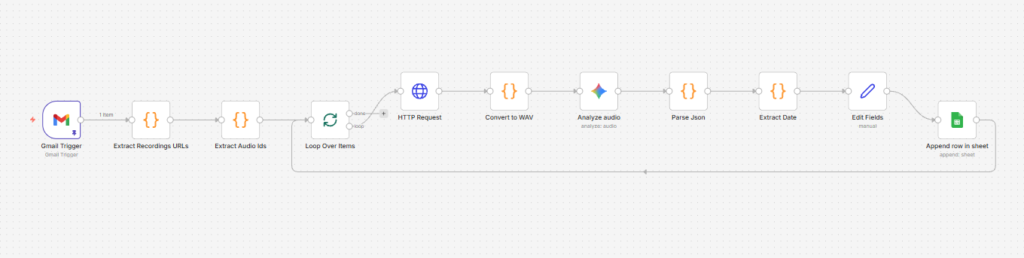
The Trigger: Your phone system emails a call recording to a specific inbox.
The Grab: n8n sees the email, grabs the recording link, and downloads the audio.
The Brain: The audio is sent to OpenAI. The AI listens to the whole thing.
The Grade: The AI compares the call against your rubric and generates a JSON report.
The Log: n8n takes that report and adds a new row to your Google Sheet with the scores and a summary.
You just open the spreadsheet and see the health of your phone lines at a glance.
If you are ready to build this, here is the roadmap. We designed this so you don’t have to code from scratch. You mostly just need to connect the pipes.
Before you start, make sure you have:
An n8n account (self-hosted or cloud).
Access to the email inbox where your phone system sends recordings.
A Google account for Sheets.
An OpenAI API Key.
Don’t reinvent the wheel. In your n8n dashboard, click “Workflows” then “Import.” Upload the “CSR Phone Call Reviewer.json” file. (If you are working with us at Super Service Bros, we provide this template directly).
This is the starting gun. Open the Email Trigger node. Select your provider (Gmail or IMAP). Enter your credentials. Set it to poll every 5 or 10 minutes.
Pro Tip: Make sure you target the specific folder or label where recordings land so the automation doesn’t try to grade your spam mail.
The automation needs to get the actual sound file. Usually, phone systems send a link. A custom code step in the workflow scans the email body to find that URL. Note: Check a real email from your phone provider. If they attach the file directly instead of sending a link, you might need a small tweak here to “Download Attachment” instead of “Download from URL.”
This is the fun part. Open the AI Analysis node. Paste in your OpenAI API Key. You will see the “System Prompt” inside. This is where we tell the AI it is a Quality Assurance Manager. You can edit the Company Name or Brand Tone here, but don’t mess with the JSON structure or the scoring logic. It’s calibrated to work.
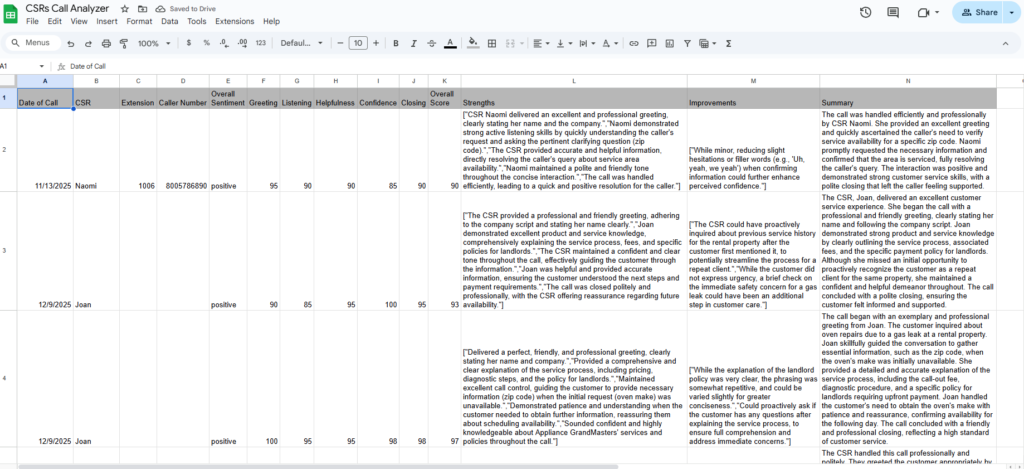
Create a new Google Sheet. Add these headers in the first row:
Date
CSR Name
Call Score
Greeting Score
Listening Score
Resolution Score
Confidence Score
Closing Score
Strengths
Improvements
Summary
Copy the Sheet ID from the URL of your spreadsheet. Paste it into the Google Sheets node in n8n. The workflow automatically maps the AI’s answers to these columns.
Click “Test Workflow” in n8n. Send a real recording email to that inbox. Watch the green circles light up in n8n. Check your Google Sheet. If a new row appears with a score and a summary, you are live.
This is important. Do not use this tool just to hammer people. If you walk in and say, “The AI said you suck,” you will destroy morale.
Use it for patterns. If you see that “Confidence” scores are low across the board, maybe you need to do a training session on your price book. If you see one CSR consistently gets low “Greeting” scores, pull them aside and listen to a few calls together.
Say, “Hey, I noticed the system flagged a few greeting issues. Let’s hear them and see how we can tweak it.” That is coaching. That builds trust.
Does the AI understand industry terms? Yes. Modern AI models are incredibly smart. They understand context like “diagnostic fee,” “heat exchanger,” or “schedule window” without needing special training.
Is it expensive to run? It is surprisingly cheap. n8n has a low monthly cost (or free if self-hosted), and OpenAI costs pennies per hour of audio. Compared to paying a human manager to listen to calls, it is a steal.
Can I use this for dispatch calls too? Absolutely. You just need to tweak the prompt slightly. Instead of looking for “booking percentage,” you might tell the AI to look for “efficient routing” or “tech communication.”
What if the audio quality is bad? The AI is pretty forgiving, but garbage in, garbage out. If the recording is mostly static or the volume is too low, the transcript will be bad, and the score will be inaccurate. Always spot-check a few.
Is this legal? You need to follow your local laws regarding call recording. Generally, as long as you have the standard “This call may be recorded for quality assurance” message, you are covered for internal review. But I am a marketer, not a lawyer—check your local regulations.
Building an AI CSR Phone Call Reviewer Automation gives you the one thing every business owner craves: peace of mind.
You stop worrying about what is happening on the phones because you know what is happening.
You get the data you need to train your team, improve your booking rates, and ultimately, make more money.
And you do it all without spending your life wearing headphones.
If this sounds great but looking at API keys makes you break out in hives, don’t sweat it. We build these systems for home service pros every day.
We can set up the triggers, calibrate the scoring, and hand you a finished dashboard.
Want to automate your QA process? Let’s talk at Super Service Bros.